Cricut SVG Converter online - Vettorizzatore immagini locale gratuito
Cricut SVG Converter gratis nel browser: converti in SVG, PDF, EPS, DXF o G-code con tracciamento locale, senza upload e senza registrazione.
Trasforma un’immagine in forme e linee modificabili.
Carica un logo, un motivo o un disegno. Controlla il risultato e scaricalo per design, taglio o incisione.
- 1. Carica l’immagine
- 2. Controlla il disegno
- 3. Scarica il file
Trascina qui immagini PNG, JPG o WebP per convertirle in SVG
Il file non lascia il dispositivo · Senza registrazione · Senza limite giornaliero
Fino a 100 MB per file
Altri vettorizzatori vs Sticraft
- Potrebbero esserci limiti di utilizzo o downloadGratis, senza limite giornaliero
- Potrebbero essere richiesti un account o un pagamentoScarica ogni risultato, senza account
- Potrebbero essere disponibili meno formati di esportazioneSVG, DXF, PDF, EPS e G-code
- Potrebbe essere necessario caricare le immaginiLa tua immagine non lascia mai il tuo dispositivo
Che cosa esce
Tre risultati reali di questo strumento, misurati. Nulla è stato ritoccato.


Un logo salvato come JPEG di bassa qualità
Gli artefatti di compressione non sopravvivono al tracciato: il risultato sono due tracciati puliti.
- tracciati
- 2
- SVG
- 7.4 KB
- precisione dei bordi
- 1.00

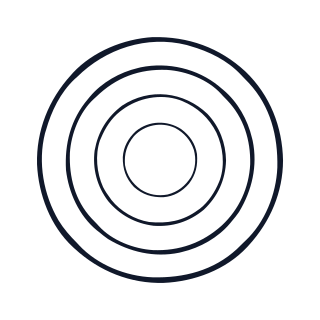
Grafica con contorni
Gli spazi tra gli anelli restano trasparenti invece di riempirsi di bianco.
- tracciati
- 4
- SVG
- 3.6 KB
- precisione dei bordi
- 1.00


Un disegno a tratto
I tratti sottili restano interi invece di essere rimossi come puntini.
- tracciati
- 3
- SVG
- 2.4 KB
- precisione dei bordi
- 1.00
La precisione dei bordi confronta il contorno tracciato con l'originale con 2 pixel di tolleranza; 1,00 è esatto.
Strumenti correlati
Come usare
- Carica la tua immagine logo or sticker. Rimane nel browser e non viene mai inviata a un server.
- Scegli il tracciamento a colori per livelli SVG modificabili, la modalità silhouette per percorsi di taglio o centerline per tratti da plotter.
- Regola colori, pulizia, offset di taglio, smoothing, risoluzione e impostazioni macchina, quindi scarica SVG, PDF, EPS, DXF, G-code, anteprima del toolpath o report JSON.
Domande frequenti
Lo strumento Cricut SVG Converter carica la mia immagine?
No. Sticraft vettorizza localmente nel browser con canvas e generazione di percorsi SVG. Il file non lascia mai il tuo dispositivo.
Quali immagini logo or sticker si vettorizzano meglio?
Loghi piatti, icone, sticker, scansioni, disegni e illustrazioni funzionano meglio. Le foto complesse possono essere posterizzate in livelli SVG, ma non sempre migliorano rispetto al raster originale.